StackScripts are a relatively new offering from Linode that allow users to
build their own installation script by “stacking” previously existing scripts
together to build the machine you want. You can keep your StackScript to
yourself, or publish it for the world to use. Deploying a distribution with a
StackScript takes only about 5 minutes, afterwards you have a fully configured
system with applications up and running. Here’s a sneak-peek at a my Drupal
StackScript for RH Derivatives deployment just
before launch: 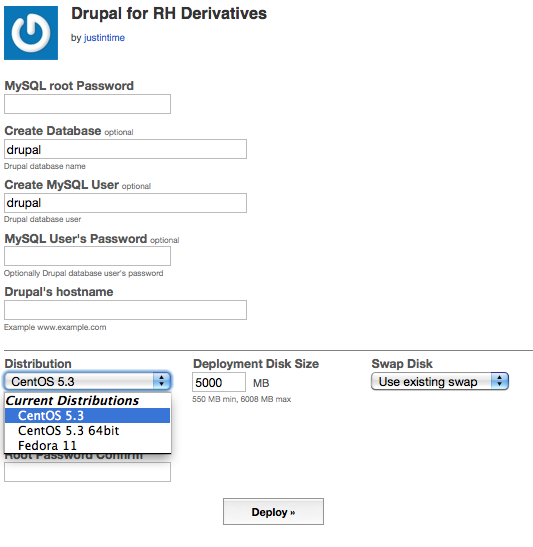 Many of the users of
Linode
appear to prefer Ubuntu, and there’s good reason – it’s a great distribution.
I run it on all my laptops and most of my desktops. However, I personally find
it a bit too bleeding edge for my servers and prefer CentOS for the server
room. Currently there are 16 StackScripts available for Ubuntu, with only 3
available for CentOS. Well, after today, there’s now 6 for CentOS! After
clicking the deploy button, you’ll have the images ready to go in less than a
minute. Boot the config, and the StackScript will run on first boot - when
it’s done, you’ll have a secured and configured LAMP stack,
drush install, Drupal
install, and all updates applied via yum. I’ve published these StackScripts so
that anyone with a
Linode
can use them with their CentOS and Fedora installations:
Many of the users of
Linode
appear to prefer Ubuntu, and there’s good reason – it’s a great distribution.
I run it on all my laptops and most of my desktops. However, I personally find
it a bit too bleeding edge for my servers and prefer CentOS for the server
room. Currently there are 16 StackScripts available for Ubuntu, with only 3
available for CentOS. Well, after today, there’s now 6 for CentOS! After
clicking the deploy button, you’ll have the images ready to go in less than a
minute. Boot the config, and the StackScript will run on first boot - when
it’s done, you’ll have a secured and configured LAMP stack,
drush install, Drupal
install, and all updates applied via yum. I’ve published these StackScripts so
that anyone with a
Linode
can use them with their CentOS and Fedora installations:
- StackScript Bash Library for RH Derivatives: This is a port of Chris Aker’s (of Linode) Bash Library for Ubuntu. You don’t use this script directly, it’s strictly for inclusion by other scripts.
- Drupal Library for RH Derivatives: This library provides two functions, install_drush and install_drupal.
- Drupal for RH Derivatives: This is a the StackScript used in the screenshot above. After clicking on the Deploy button, you’ll have a working Drupal installation up and running in about 5 minutes. If you use them and find any bugs or have any RH-based StackScripts you’d like made available, post a comment and I’ll see what I can do. In the interest of full disclosure, the links to Linode in this article have a referral code in them that will give me $20 credit if you sign up and keep your account open for 90 days. If you like these StackScripts, please use my links to sign up for a Linode - you’ll wonder how you did without one!